
Rosie AI review: a cheap AI answering service in English and Spanish
Rosie answers calls in English and Spanish from $49 a month, with a 7-day free trial. Which plan 200 calls a month needs, and when Rosie is the right pick.
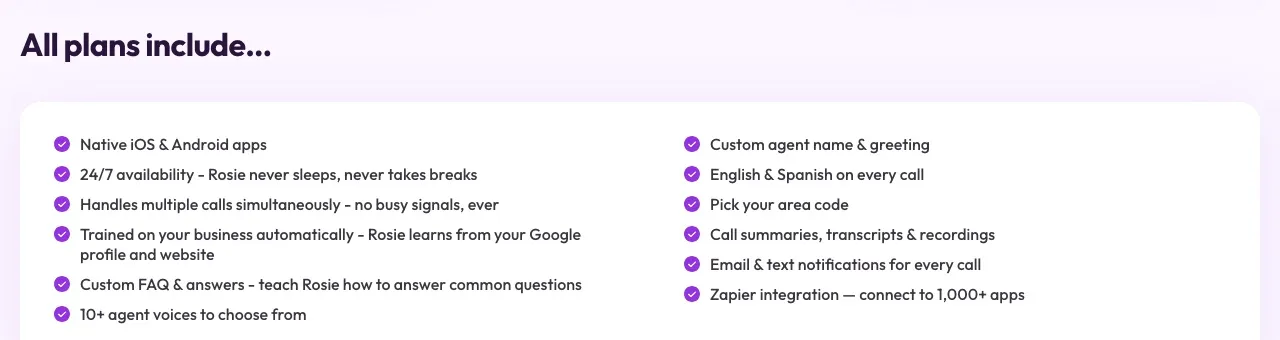
Rosie is a self-serve AI answering service for small businesses. It trains itself from your Google Business Profile and website, answers calls 24/7 in English and Spanish, takes messages, filters spam and robocalls, and sends you a summary, transcript and recording of every call by email, text or its iPhone and Android apps (Rosie).
It’s one of the cheaper ways to stop missing calls, and the pricing has a twist worth understanding before you pick a plan: there’s no per-minute overage.
Who it’s for
Rosie suits solo owners and small businesses that miss calls and want something they can set up themselves in an afternoon: a salon, a landscaper, a small shop, a cleaning company. It’s a strong pick if some of your callers speak Spanish, because both languages come on every plan (bilingual answering). Online stores get a Shopify integration that lets Rosie look up orders, tracking and products during a call (Shopify).
It fits less well if your bookings live in field-service, practice-management or legal software. Rosie books directly into Google Calendar and Calendly only, and connects to CRMs through Zapier.
What callers hear
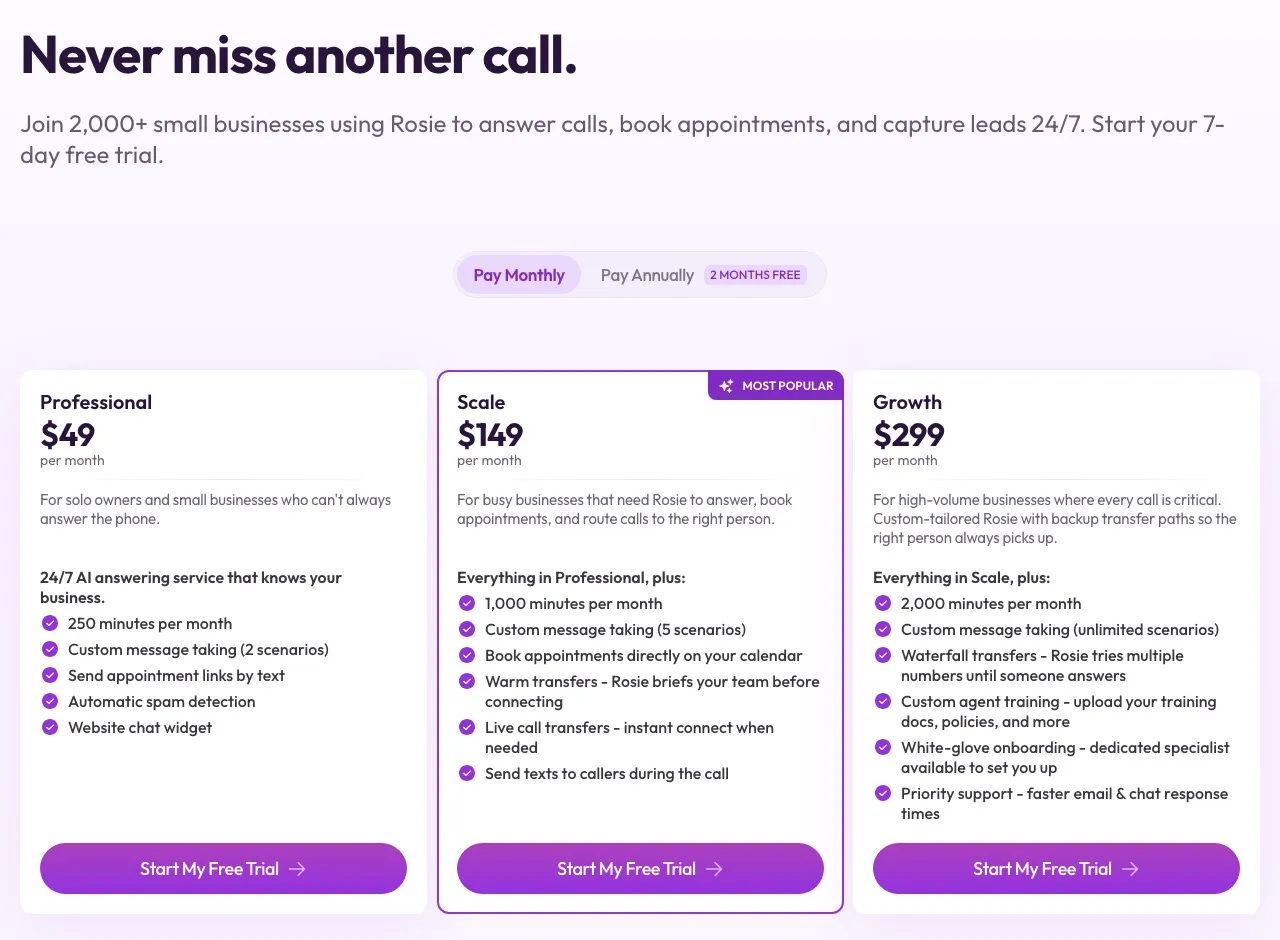
Callers reach an AI that answers questions about your business from what it learned from your profile and site, takes a message, and on the Scale plan and up, books an appointment, texts the caller during the call, or transfers them to your team. On the $49 Professional plan it can’t book or transfer live; it texts the caller a booking link instead.
That split is the most important thing to know about Rosie. If what you want is “answer, book the appointment, and put urgent calls through to me”, you’re on the $149 plan, not the $49 one.
What it costs at real call volumes
The three plans are $49 for 250 minutes, $149 for 1,000 and $299 for 2,000, or $41, $124 and $249 a month if you pay for a year (pricing).
Going over your minutes doesn’t trigger per-minute charges. Instead, Rosie moves you up to the next plan at its price until you downgrade. That’s simpler than metered overage, but it’s a step, not a slope: going 20 minutes over on Professional costs you $100 more that month.
Take 200 calls a month at about 3 minutes each: 600 minutes. Professional’s 250 minutes covers only about 80 calls, so you’d be on Scale either way. At $149 for 600 minutes you pay about $0.75 a call, or $0.62 billed annually, with 400 minutes of headroom. That’s cheap for an AI receptionist with booking and live transfers.
At low volume the math changes. A business that gets 50 calls a month at 3 minutes uses 150 minutes, and Professional at $49 covers it, about $1 a call, as long as you’re happy with message taking and texted booking links.
For comparison at 600 minutes: My AI Front Desk comes to about $189, Dialzara about $239, and per-call Upfirst $159.95 for 200 calls. Rosie’s Scale plan undercuts all three.
Trial, contracts and setup
Every plan has a 7-day free trial; cancel before it ends to avoid a charge. There’s no contract and no cancellation fee, upgrades apply immediately and downgrades at the next billing cycle.
Rosie creates a phone number for you when you sign up, in an area code you choose. You keep your existing number by forwarding calls to it, either all the time or only after hours and when you’re busy (how forwarding works). Because it trains from your Google Business Profile and website, a basic setup takes as little as 10 minutes. Expect to spend longer adding the answers your profile doesn’t cover, like pricing ranges and service area.
What it books into
On Scale and Growth, Rosie books straight into Google Calendar or Calendly. That’s fine for a salon, a consultant or a small office. It won’t put jobs on a ServiceTitan or Jobber board; for that, see our best AI receptionists for home services. Direct CRM integrations are still in the works, so anything else goes through Zapier.
When the AI can’t handle a call
On Scale it transfers the caller live, or warm with context, to your team. Growth adds waterfall transfers that try several numbers until someone picks up. On Professional, a call the AI can’t handle becomes a message. If you want a live receptionist team behind the AI rather than your own staff, look at Smith.ai or Abby Connect.
Privacy and records
Rosie says calls, transcripts and recordings are encrypted and that it doesn’t use your call content to train external AI models. Recordings are deleted automatically after 30 days, so download any you need to keep. If you handle patient health information, ask Rosie about HIPAA before you sign up.
How it compares
vs Goodcall. Goodcall bills by unique caller from $79 and books into Google Calendar, but answers in English only.
vs Upfirst. Upfirst starts lower, at $24.95 for 30 calls, and every feature, including booking and transfers, is on every plan. Better for very low volume; at 200 three-minute calls, Rosie’s Scale ($149) edges out Upfirst’s Pro ($159.95).
vs Dialzara. Dialzara’s $29 plan is cheaper to start and answers in 10 languages, but it bills per minute with overage.
Verdict
Rosie is one of the best values for a small business that wants a bilingual AI receptionist without a sales call. Self-serve setup from your Google profile, published prices, a free week and no contract make it easy to try. Budget for the $149 Scale plan if you want booking and live transfers, watch the jump to the next plan when you go over, and save recordings you need before the 30 days are up. Compare it with others on our cheap AI receptionist page.
Pricing
| Plan | Price | Included | Extra use | Details |
|---|---|---|---|---|
| Professional | $49/mo | 250 min | – |
|
| Scale | $149/mo | 1,000 min | – |
|
| Growth | $299/mo | 2,000 min | – |
|
Strengths
- Published, self-serve prices from $49 a month for 250 minutes, with a 7-day free trial
- No per-minute overage: going over your minutes moves you to the next plan's flat price
- No contract or cancellation fee; cancel from the admin anytime
- Trains itself from your Google Business Profile and website, with setup in as little as 10 minutes
- English and Spanish, call recordings, transcripts and summaries on every plan, plus iOS and Android apps
Weaknesses
- Calendar booking and live call transfers start on the $149 Scale plan; Professional only texts a booking link
- Direct calendar integrations are limited to Google Calendar and Calendly
- CRMs connect only through Zapier for now; direct CRM integrations are still in the works
- Call recordings are deleted automatically after 30 days
Best for
Sources
- Rosie pricing and FAQChecked Nov 8, 2026
- Rosie homepageChecked Nov 8, 2026
- Rosie: dental answering service (new Rosie number at signup, call forwarding)Checked Nov 8, 2026
- Rosie Shopify integrationChecked Nov 8, 2026
- Rosie bilingual answering serviceChecked Nov 8, 2026
- Rosie terms of serviceChecked Nov 8, 2026