
Quo review: Sona, the AI receptionist in Quo's phone system
Quo (formerly OpenPhone) includes Sona, an AI agent that answers calls. What 200 calls cost with the phone plan it needs, how booking works, and who it suits.
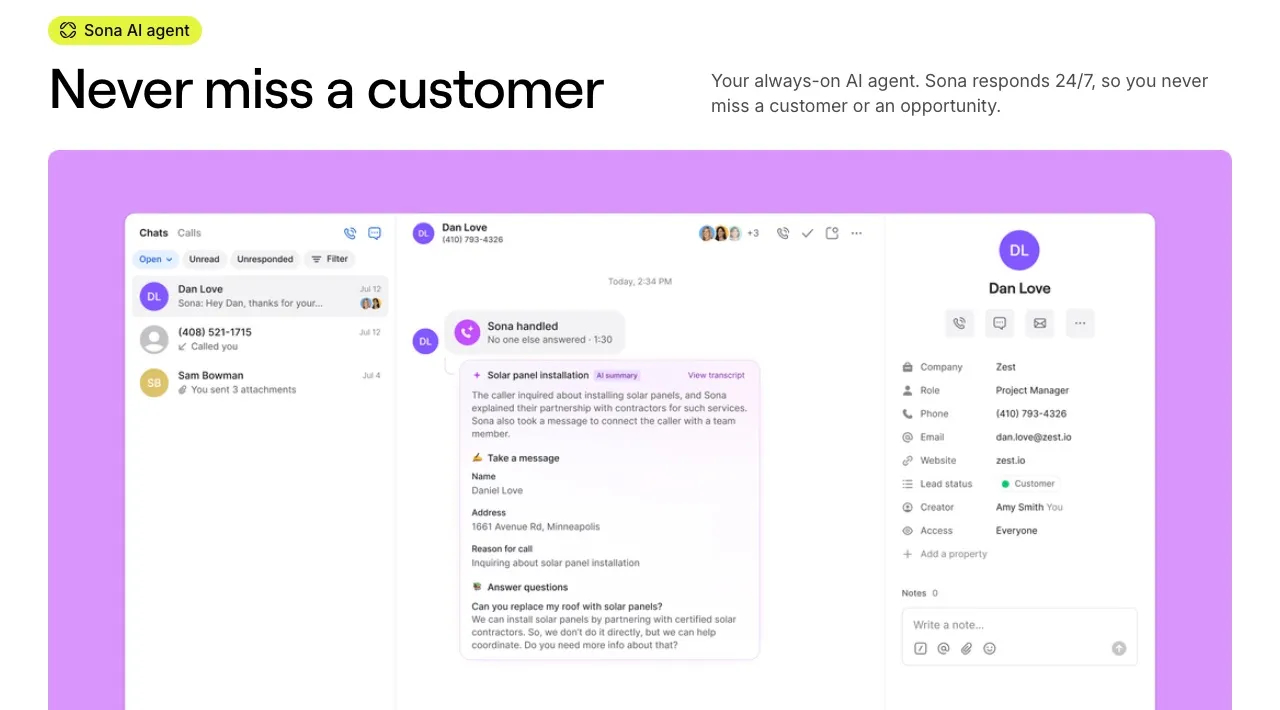
Quo, formerly OpenPhone, is a business phone system for small teams, with apps for the web, Mac, Windows, iPhone and Android. Sona is its built-in AI agent. You add Sona to a call flow, and it greets callers, answers questions from a knowledge base you write, takes messages, qualifies leads, transfers calls and texts callers links mid-call (Sona).
This review is about Sona as an AI receptionist. The thing to understand first: Sona only works on Quo numbers. You can’t put it in front of another phone system, so buying Sona means moving your business line to Quo, and paying for a Quo plan per user.
Who it’s for
Quo with Sona suits a small team that wants a business number, shared texting and an AI agent for missed and after-hours calls, all in one app. A two-person property management office, a small law practice, or a contractor answering calls from the truck fits well. It’s especially natural for home service businesses on Jobber, since Sona can create a Jobber request straight from the call (Sona actions).
It fits less well if you’re happy with your current phone provider, or if you need the AI to put appointments directly in your calendar.
What callers hear
You decide when Sona answers: every call, only missed calls, after hours, or after a phone menu, which needs Business or Scale (setup). Callers hear one of four voices, in English, Spanish or French. Sona answers from your knowledge base, collects what you’ve asked it to, and can transfer the call to a teammate, a shared inbox or an outside number. After a transfer Sona drops off the call.
Every Sona call is recorded, transcribed and summarized in the Quo inbox, so whoever calls back sees what was said. Summaries are always in English, even for Spanish or French calls.
Sona only answers inbound calls. It can’t make reminder or follow-up calls; a separate beta lets it follow up with leads by text.
Booking appointments
This is the main limit for appointment-based businesses. Sona schedules by texting the caller a booking link mid-call (job guide). Quo doesn’t document any calendar that Sona books into directly.
For many businesses a link works fine: the caller books on your Calendly or scheduling page while still on the phone or right after. But the caller has to finish the booking themselves, and some won’t. If you want the slot confirmed on the call, a receptionist that books straight into your calendar, such as NextPhone or RingCentral AI Receptionist, is a better fit.
What it costs, phone plan included
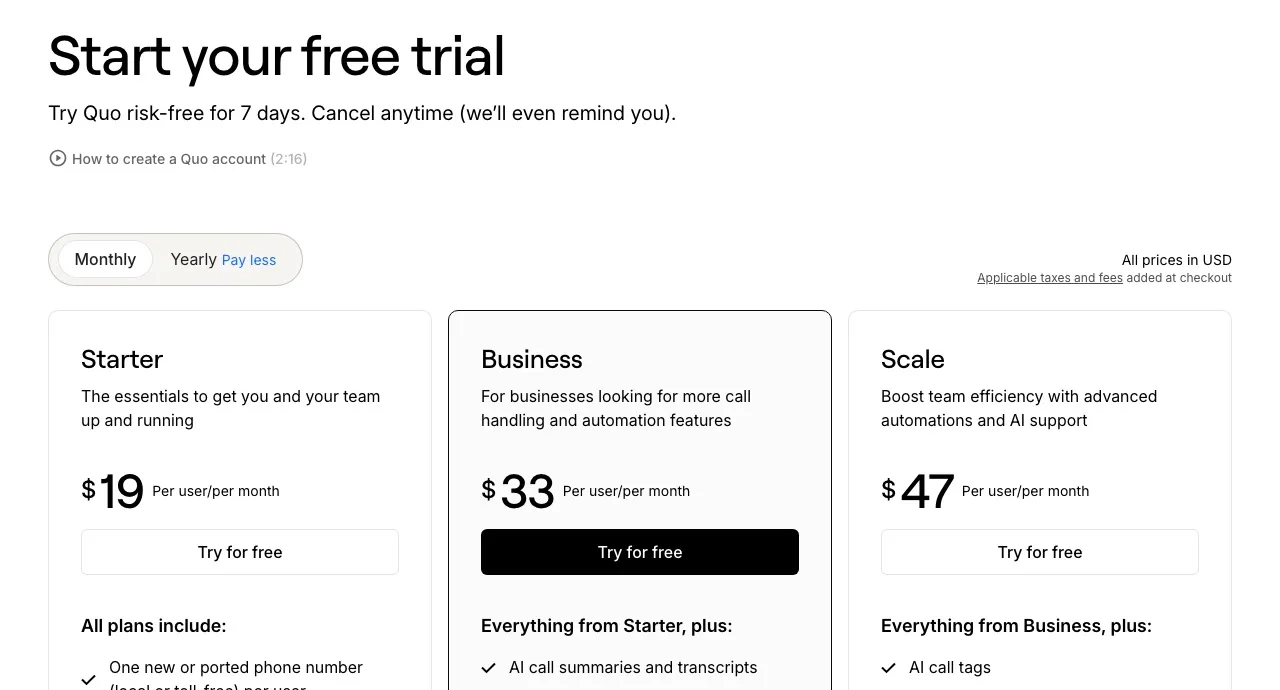
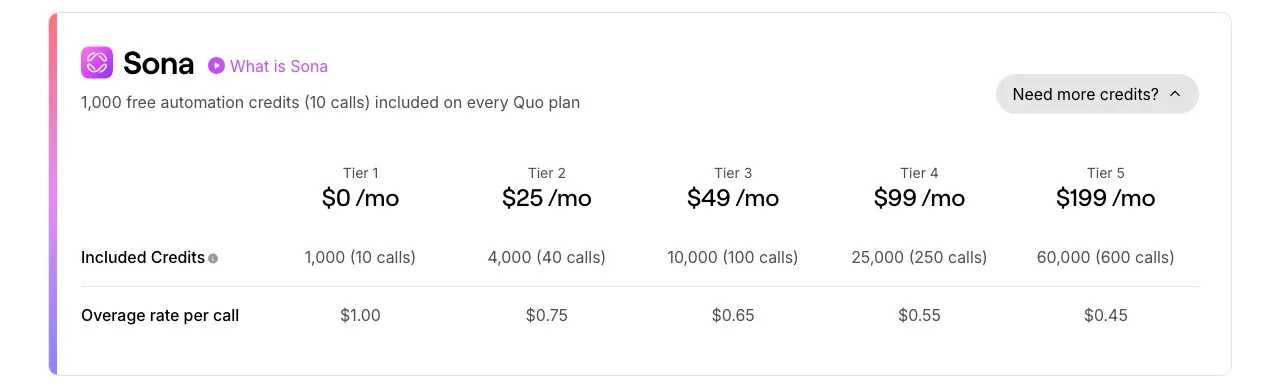
Quo’s phone plans cost $19, $33 or $47 a user a month, or $15, $23 or $35 billed yearly (pricing). Every workspace gets about 10 Sona calls a month included. More calls come from monthly Sona tiers: $25 for 40 calls, $49 for 100, $99 for 250 and $199 for 600.
Sona bills per call, not per minute, and calls under 15 seconds don’t count. Overage is off by default: when you run out, Sona stops and calls go to the fallback in your call flow. If you switch overage on, extra calls cost $0.45 to $1.00 each depending on your tier (Sona pricing).
Take 200 calls a month at about 3 minutes each. Because billing is per call, the minutes don’t matter. Tier 4 at $99 covers 250 calls. Tier 3 plus overage (100 calls, then 100 more at $0.65) would come to $114, so Tier 4 is the cheaper route.
- 1 user on Starter, monthly: $19 + $99 = $118 a month, about $0.59 a call.
- 1 user on Starter, yearly: $15 + $99 = about $114 a month. Sona credits still refresh monthly and overage is billed monthly.
- 3 users on Business, monthly: $99 + $99 = $198 a month.
For a solo owner, $118 a month for 200 AI-answered calls plus a full phone system is one of the best deals in this category. The per-user phone plan is what changes the picture for bigger teams: every extra seat adds $19 to $47 a month on top of Sona.
At very low volume it’s even cheaper. A business that only wants Sona on after-hours calls and gets about 10 a month pays nothing beyond the phone plan.
Which plan to pick
Starter is enough for many solo businesses, but it only gives you summaries and transcripts for calls Sona handled, not calls your team took. Business adds summaries for every call, phone menus, live call transfers by your team, automatic recording, HubSpot and Salesforce, and a HIPAA business associate agreement (HIPAA). Quo’s help docs tie only those manual transfers to Business (call transfer); they set no plan limit on Sona’s own transfer step. A healthcare or therapy practice needs Business or Scale, and under Quo’s BAA you are responsible for telling patients when AI is used and calls are recorded.
Setup and trial
Quo offers a 7-day free trial that includes Sona and the other AI features (trial). Plans are month to month. Getting started means getting a Quo number or porting yours in, which Quo does for free, then adding Sona to a call flow and writing its knowledge base. A good knowledge base is most of the work: your hours, services, prices and the questions callers ask most.
How it compares
vs RingCentral AI Receptionist. RingCentral’s agent works with any phone system and books into Google, Outlook or Calendly. It bills per minute at $0.50 past the first 100, so 200 three-minute calls cost about $299, more than double Quo’s one-user price.
vs Simple Phones. $149 for up to 500 calls with your existing number forwarded, but going over the limit releases your numbers.
vs Upfirst. Also per-call, and books into several calendars; its Pro plan costs $159.95 for 300 calls without a phone system.
See the best AI receptionists for home services and the cheapest AI receptionists for more.
Verdict
Sona is a strong value if you want, or already have, Quo as your phone system. Per-call pricing with an overage switch keeps the bill predictable, and a solo owner gets 200 AI-answered calls a month plus a business phone for about $118. The trade-offs are real: you have to move your number to Quo, it schedules by text link rather than booking your calendar, it never calls out, and a bigger team pays per seat. If you’d rather keep your current phone provider, look at an AI receptionist that works with any line.
Pricing
| Plan | Price | Included | Extra use | Details |
|---|---|---|---|---|
| Starter | $19/mo | 10 calls | $1 per extra call |
|
| Business | $33/mo | 10 calls | $1 per extra call |
|
| Scale | $47/mo | 10 calls | $1 per extra call |
|
| Starter + Sona Tier 2 | $44/mo | 40 calls | $0.75 per extra call |
|
| Starter + Sona Tier 3 | $68/mo | 100 calls | $0.65 per extra call |
|
| Starter + Sona Tier 4 | $118/mo | 250 calls | $0.55 per extra call |
|
| Starter + Sona Tier 5 | $218/mo | 600 calls | $0.45 per extra call |
|
Strengths
- Cheap to start: every Quo plan includes about 10 Sona calls a month, and 600 calls cost $199 a month on top of the phone plan
- Per-call pricing with an overage switch: leave it off and Sona never bills beyond your tier, or turn it on at $0.45 to $1.00 a call
- A full business phone system comes with it: numbers, free porting, shared inboxes, texting, phone menus and apps on every device
- Sona transfers callers, texts links mid-call and logs every call with a recording, transcript and summary
- Answers in English, Spanish or French, and a HIPAA BAA is available on Business and Scale
Weaknesses
- Works only inside Quo: your calls have to come through a Quo number, so you can't add Sona to another phone system
- Answers inbound calls only; Sona can't make outbound calls
- Scheduling means texting the caller a booking link; Quo documents no calendar that Sona books into
- The phone plan is priced per user, so a larger team pays for every seat on top of Sona's tier
- Starter only gets summaries and transcripts for Sona-handled calls, and call summaries are always in English
Best for
Sources
- Quo pricing (plans, Sona credit tiers, integrations, add-ons, FAQ)Checked Nov 8, 2026
- Quo: Sona AI agent (capabilities and FAQ: pricing, trial, languages, inbound only)Checked Nov 8, 2026
- Quo help: Sona pricing (credits, tiers, overages, eligibility)Checked Nov 8, 2026
- Quo help: Sona setup and configuration (call flows, voices, languages)Checked Nov 8, 2026
- Quo help: Sona actions (send SMS, transfer call, create Jobber request)Checked Nov 8, 2026
- Quo help: Sona job guide (scheduling by booking link)Checked Nov 8, 2026
- Quo help: HIPAA compliance (BAA on Business and Scale)Checked Nov 8, 2026
- Quo help: Managing your trial (7 days, includes Sona)Checked Nov 8, 2026
- Quo help: Install apps (web, Mac, Windows, iOS, Android)Checked Nov 8, 2026
- Quo help: Call transfer (manual transfers need Business or Scale)Checked Nov 8, 2026