
Phonely review: a self-serve AI receptionist with a call-flow editor
Phonely answers calls, books into Google Calendar and transfers to your staff from $50 a month. What 200 calls a month really costs and which plan to pick.
Phonely is an AI phone agent you sign up for yourself. Onboarding builds a working agent and gives you a phone number; you forward your existing number to it (Phonely) or ask to port it over (terms). From there the agent answers questions from what you’ve told it about the business, collects the caller’s details, books into Google Calendar, texts the caller, transfers to your staff and sends you a summary after each call.
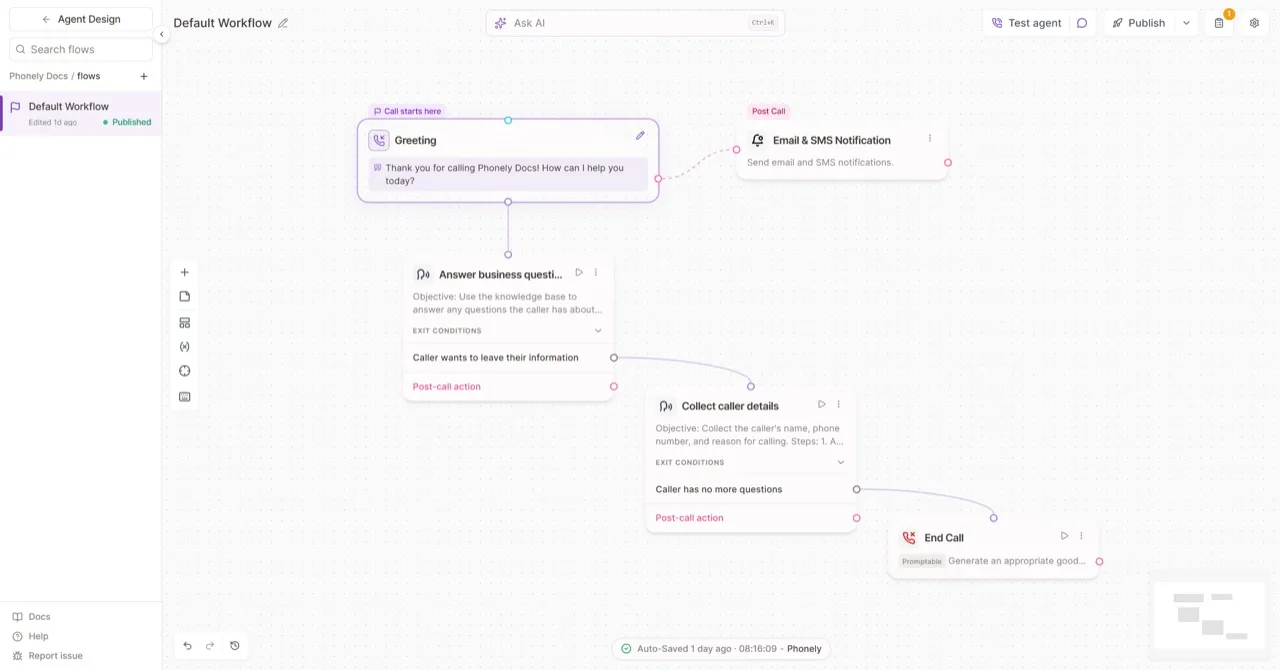
Under that simple start sits a visual call-flow editor. That is the reason to pick Phonely over a plainer AI receptionist, and also the thing to be honest with yourself about: you only get its value if someone on your side will open the editor.
Who it’s for
Phonely suits a small business that wants to start answering missed calls this week and expects to tune the agent over time. A counseling practice, a salon or a small agency that books through Google Calendar is the natural fit. The free start helps here: your first 100 minutes cost nothing, which is enough for a few dozen real calls before you pay (Phonely).
It is a weaker fit if your bookings live in field-service or practice software. Google Calendar is the only calendar Phonely documents for booking (integrations). A plumber on Jobber or a law firm on Clio would be retyping every appointment, or wiring it up through Zapier or Make.
What callers hear
Callers reach an AI agent that greets them, answers questions, takes their name, number and reason for calling, and either books a slot, texts them something, or passes the call to a person. The starter flow Phonely creates is short: greeting, answer questions, collect details, end the call, then email and text you a summary (call flows).
When the AI can’t handle a call, the transfer is your safety net. Phonely supports warm and cold transfers to your staff (Transfer Call). Plan for who picks up: a transfer to a phone nobody answers is still a missed call.
The editor lets you go further: route by intent, call an outside system mid-call through an API request, or A/B test changes (call flows). Most small businesses won’t need that on day one, and the default flow works without it.
What it costs at 200 calls a month
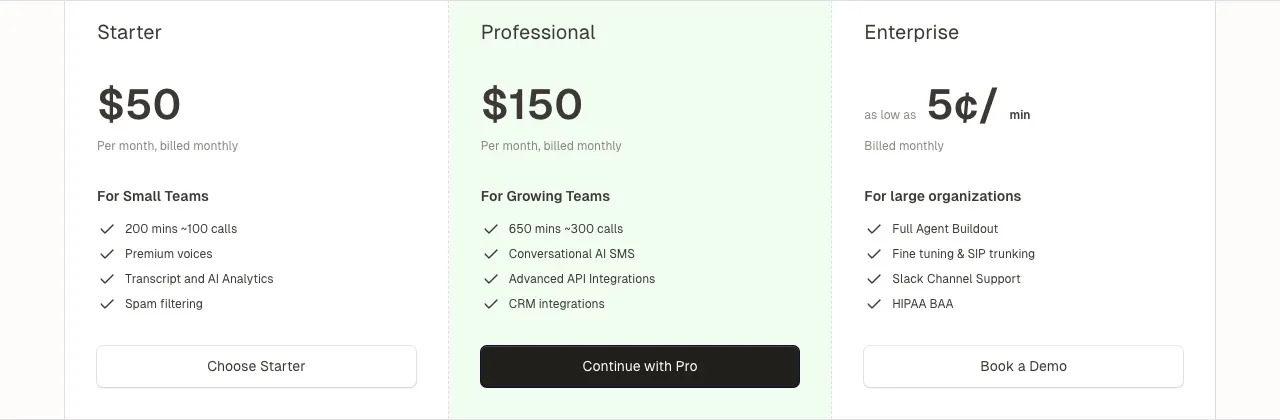
Phonely bills by the minute. Take 200 calls a month at about 3 minutes each: 600 minutes.
- Starter, monthly: $50 covers about 200 minutes. The other 400 minutes at $0.25 add $100, so about $150 a month, or $0.75 a call.
- Professional, monthly: $150 covers about 650 minutes, so the same 600 minutes cost $150 with no overage.
At that volume the two plans cost the same, and Professional also gets you outbound calling, CRM integrations and five numbers. Pick Professional. Below 600 minutes Starter is cheaper: at 400 minutes, about 130 three-minute calls, it costs $100 against Professional’s $150.
Paying yearly changes the sums. Professional drops to $100 a month, which covers 600 minutes at about $0.50 a call. Starter drops to $33, but its overage in the annual table is $0.35 a minute, so 600 minutes would cost about $173. If you commit for a year at this volume, Professional is the clear choice (pricing).
Two things to read before you pay. The pricing page lists different included minutes in two places: 200 or 250 on Starter, 650 or 750 on Professional. Budget on the lower numbers. And minutes after a transfer can still be billed at $0.02 a minute, which adds up if your staff stay on transferred calls for a long time (pricing).
Contracts, refunds and setup
Plans are month to month, and the monthly price needs no yearly commitment. Phonely’s terms say payments are non-refundable except where the law requires, so a yearly plan is money you won’t get back if it doesn’t work out (terms). Use the free 100 minutes and a month or two on monthly billing before switching.
Phonely doesn’t mention a setup fee on its pricing page. Setup itself is self-serve: the onboarding flow creates the agent and the number in minutes. Making it good takes longer. Write down your hours, services, prices and the questions you’re asked most, and test-call it yourself before forwarding real calls.
If you need a HIPAA business associate agreement, that is Enterprise only, along with a team that builds the agent for you (pricing). A medical or therapy practice handling health information should plan for an Enterprise quote rather than Starter.
How it compares
vs My AI Front Desk. Both bill by the minute with the same $0.25 overage on their entry plans. My AI Front Desk costs $99 for 200 minutes and adds chat, texting and a CRM in one bundle; Phonely is cheaper for the same minutes and has the deeper call-flow editor.
vs Dialzara. Dialzara starts lower at $29, but 600 minutes on its Business Plus plan come to about $239 ($199 for 500 minutes plus $0.40 a minute), more than Phonely Professional, and it books into Outlook as well as Google Calendar.
vs NextPhone. NextPhone charges a flat $199 for unlimited calls and books into six calendar tools. Below about 800 minutes a month Phonely Professional is cheaper; above that, NextPhone’s flat price wins.
For more options at this price, see the cheapest AI receptionists and our AI receptionist pricing guide.
Verdict
Phonely is a good self-serve AI receptionist for a business that books in Google Calendar and wants to grow into custom call flows. At around 200 calls a month, go straight to Professional: it costs the same as Starter plus overage and includes more. Start on the free 100 minutes, stay monthly until you trust it, and budget on the lower minute numbers its pricing page shows. If your bookings live in industry software or you need a HIPAA agreement without an enterprise contract, look elsewhere.
Pricing
| Plan | Price | Included | Extra use | Details |
|---|---|---|---|---|
| Starter | $50/mo | 200 min | $0.25 per extra minute |
|
| Professional | $150/mo | 650 min | $0.30 per extra minute |
|
| Enterprise | Custom | – | – |
|
Strengths
- Self-serve from $50 a month with published per-minute overage, and the first 100 minutes free
- Visual call-flow editor with routing, warm or cold transfers, API requests and A/B testing when a simple answering agent isn't enough
- Books into Google Calendar and connects to Gmail, Outlook, Slack, Google Sheets, Zapier and Make
- Includes phone numbers (3 on Starter) and works with your existing number by forwarding or porting
- The same agent can answer by phone, SMS and web chat
Weaknesses
- HIPAA BAA, a built-for-you agent and a dedicated account manager are Enterprise-only
- Outbound calling and CRM integrations start at the $150 Professional plan
- The pricing page contradicts itself on included minutes (200 vs 250 on Starter, 650 vs 750 on Professional)
- Minutes after a transfer can still be billed, at $0.02 a minute
- Payments are non-refundable under its terms, except where the law requires
Best for
Sources
- Phonely homepageChecked Nov 8, 2026
- Phonely pricingChecked Nov 8, 2026
- Phonely integrationsChecked Nov 8, 2026
- Phonely docs: integrations overviewChecked Nov 8, 2026
- Phonely docs: Transfer CallChecked Nov 8, 2026
- Phonely docs: Call History (transcripts and recordings)Checked Nov 8, 2026
- Phonely docs: Send SMSChecked Nov 8, 2026
- Phonely docs: Call FlowsChecked Nov 8, 2026
- Phonely template: counseling appointments (setup and number forwarding)Checked Nov 8, 2026
- Phonely Terms of ServiceChecked Nov 8, 2026